Elastic Stack Configuration Files
The load-config.js script scans the directory stated below for JSON files and uses their content for the configuration of the different components of SEAL Elastic Stack.
-
Windows:
C:\Program Files\SEAL Systems\seal-dpf-elasticstack-configuration\configuration\seal-dpf -
Linux:
/opt/seal/seal-dpf-elasticstack-configuration/configuration/seal-dpf
Example - configuration directory contained in SEAL Elastic Stack 7.16.0.53
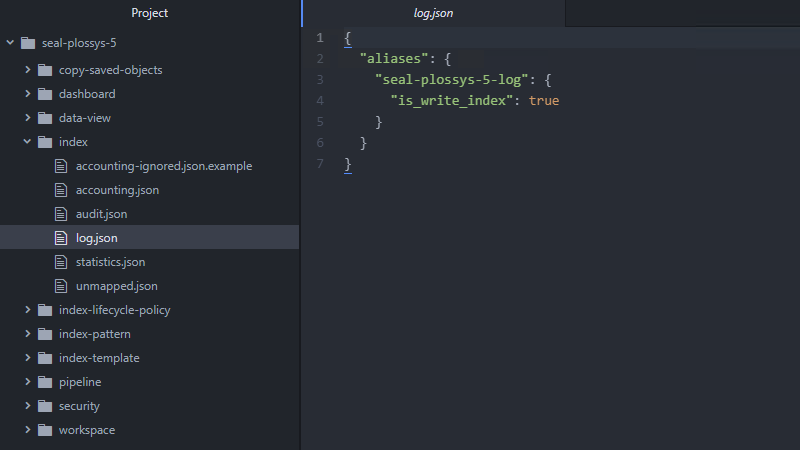
The following subdirectories of the seal-dpf directory contain JSON files for the respective components, to manipulate fields in index patterns, to define ingest pipelines, to adjust the Kibana UI, dashboards and sample searches or to generate users, roles, and role mappings.
The JSON files in the subdirectories are named after the respective data type:
-
accounting.json -
audit.json -
log.json -
statistics.json
If a JSON file or a subdirectory does not exist, the load-config script skips the configuration of the corresponding component.
dashboard
Dashboards to visualize the log data of Digital Process Factory.
data-view
Index patterns for accessing the data stored in the specific index. Previously, data-view was named index-pattern, refer to see Kibana API documentation.
fields
Customization of fields of an index pattern, refer to Kibana API documentation.
index
Elasticsearch index, refer to original documentation.
index-lifecycle-policy
Housekeeping of the data in the specific index, refer to original documentation.
index-pattern
Index patterns for accessing the data stored in the specific index, refer to Kibana API documentation. As of Elastic Stack 8.0 index-patterns are named data-views.
index-template
Template used when creating the index, refer to original documentation.
components
Reusable subcomponents for index templates, refer to original documentation.
pipelines
Ingest pipelines to adjust incoming data, refer to original documentation.
In Elasticsearch, you will find a number of predefined processors for ingest pipelines, which are comparable to filebeat processors, refer to original documentation.
SEAL Elastic Stack 7.17.3 provides a concept for safely updating ingest pipelines. Aim is to combine SEAL-specific and customer-specific pipelines in a way that allows the SEAL-pipelines to be updated without overwriting the customer-specific parts.
search
Predefined Kibana searches for an easier analyzation of the log data.
security
The security subdirectories contain JSON files that are used to automatically generate users, roles, and role mappings. *.json.example files are included as well.
role
Definition of roles, see original documentation.
user
Definition of users, see original documentation.
You may use an online tool for creating passwords encrypted with BCRYPT10, which is the standard of Elasticsearch, e.g. Bcrypt Hash Generator & Verifier.
role-mapping
Definition of role mappings, see original documentation.
workspace
Used to customize the Kibana UI. You can use Kibana spaces to restrict the Kibana user interface to essential features, e. g. a space for working with accounting data, refer to Kibana API documentation.
In the screenshot, you can see that for the SEAL Accounting space only 4 of 23 possible features are visible. seal-accounting.json.example is a deactivated sample configuration.
Best practice here is combining a Kibana space with the definition of a corresponding role and its link, e. g. with an accounting user.