Update
For updating Digital Process Factory follow the steps below:
-
Check Preconditions and Requirements.
-
Execute version specific steps needed to be done before the respective update as described in the sections below. If no steps are listed continue with the next step.
-
Install the new version of Digital Process Factory, refer to Installation. If not otherwise mentioned, the Frozen Master does not need to be updated.
-
Execute version specific steps needed to be done after the update as described in the sections below.
Hint - skipping releases
If a release has no update information, no special actions are needed for this specific release.
When skipping releases while updating, execute the update steps for the skipped releases too. For example, when updating from 5.7.0 to 6.1.0, the steps specified for 5.7.1 and 6.0.0 have to be executed as well.
Update to 4.3.0
As of Digital Process Factory 4.3.0, Filebeat ships with Digital Process Factory. The name of the new Filebeat service is seal-dpf-filebeat. As of Filebeat 8.0.0, Elastic changed the names of Filebeat log files. The name specified in the configuration file is used as the base name and is supplemented with a timestamp and a rotation ID. Instead of /var/log/seal/seal-filebeat.log, the current log file is now, for example, /var/log/seal/seal-dpf-filebeat.log-20260526-3.ndjson. Because of the rotation ID, the name of the most recent log file changes with each rotation. The default rotation is 7.
After the Update (4.3.0)
If you were already using Elastic Stack with DPF, you have to merge the old Filebeat configuration file with the new one.
-
Open the new configuration file.
/opt/seal/etc/filebeat-dpf.yml -
Open the old configuration file.
/opt/seal/etc/filebeat.yml.install-bak -
Replace the complete
outputsection of the new configuration file with the one from the old one.Hint - timestamp
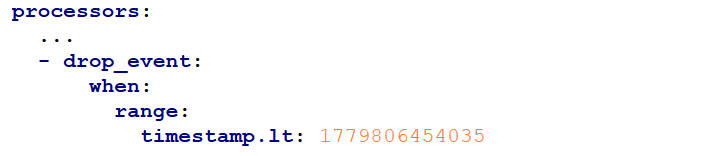
https://seal-elasticstack.docs.sealsystems.de/guide/en/elasticsearch/reference/current/processors.html.drop_event.when.range.timestamp.ltnow contains a non-zero value. It marks the time at which the log file format and name changed. Keep it. For more information refer to Elastic's Beats reference.Example:
Hint - tags
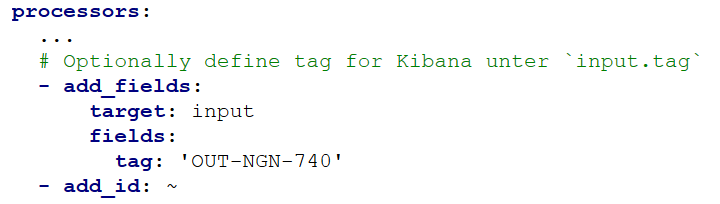
If you are working with tags, set
fields.tagforhttps://seal-elasticstack.docs.sealsystems.de/guide/en/elasticsearch/reference/current/processors.html.add_fields.target:inputaccordingly.Example:
-
Save the new configuration file.
-
Restart
seal-dpf-filebeat.
Update to 4.1.0
The internal architecture of Digital Process Factory has been changed to a microservice architecture, thus making it clusterable and faster. For this, the installation of MongoDB, SEAL NATS and SEAL Logrotate are required prior to the installation of Digital Process Factory.
For DPF 4.1.0, the DPF Tracker of Frozen Master 2025-1 resp. DPF 3.3.1 is recommended. Otherwise, when sending jobs via REST interface to the DPF 4.1.0, the responsible user is not shown in DPF Tracker.